Capacity planning that keeps the roadmap realistic
A roadmap is only a plan if the team has time to deliver it. ProductOS puts team capacity next to the roadmap, so you see overload before it turns into missed dates.
Free during early access · No demo calls · Set up in minutes
Capacity per person
Add team members with their role and the days per week they have for product work. Link a person to their user account, or add people who don't use ProductOS themselves.
Allocations across products
Split each person's time between products in days per week. The team roster shows who works on what across the whole portfolio.
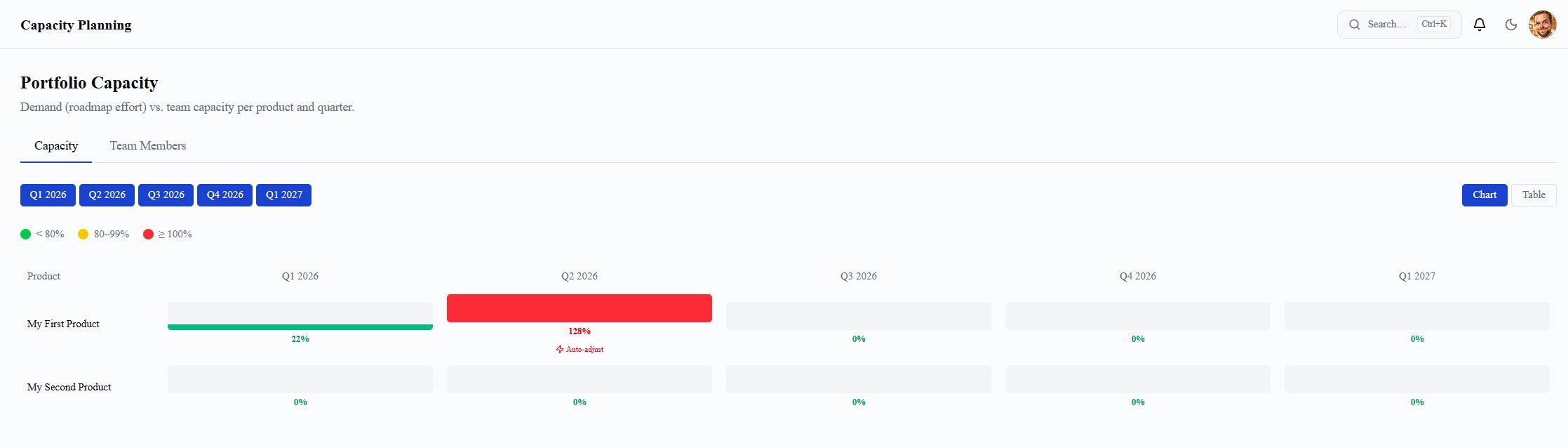
Utilisation by quarter
Charts and a summary table show allocated against available capacity by quarter, so you can see at a glance where the team is overloaded.
Plan with capacity in mind
Capacity sits in the same workspace as the roadmap, so you can check whether the team has room for new work before you commit to it.
Frequently asked questions
What is capacity planning in product management?
Capacity planning compares the work on your roadmap with the time your team actually has. It shows early when a plan needs more people, less scope or a later date.
How is capacity measured in ProductOS?
In days per week. Each team member has a weekly capacity, and you allocate part of it to each product. Utilisation is the share of that capacity that's allocated.
Do team members need their own login?
No. You can add people to the team roster without giving them an account, or link them to an existing user.
Is ProductOS free to try?
Yes. Sign up and start using it straight away. There's no paywall and no demo call.
More ProductOS features
Try ProductOS with your own roadmap
Set up your first product in minutes. No paywall, no demo call.
Start for free