Your roadmap, in your AI assistant
ProductOS has a built-in MCP server. Connect Claude, Cursor or another MCP client with a personal token, then ask about your products, goals, roadmap and feedback, or let the assistant update them for you.
Free during early access · No demo calls · Set up in minutes
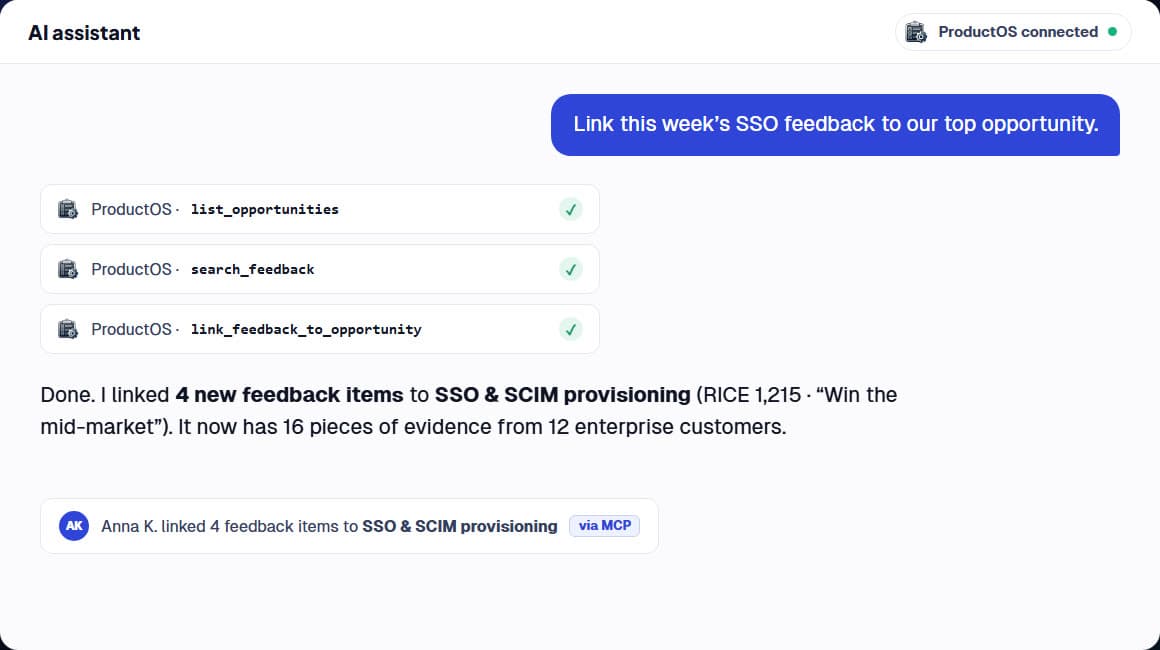
Ask in plain language
“What's at risk on the Q1 roadmap?” “Which accepted opportunities have the most customer evidence?” The assistant reads your products, goals and key results, opportunities with their RICE and BSC scores, roadmap items and feedback, and answers from your live data.
Update work without switching tools
Turn a list of customer notes into feedback items, group them into a new opportunity, link evidence, move an opportunity or initiative to a new status, update key-result progress or comment on an item, all from the conversation.
Your permissions, your workspace
A token acts as you, with your role's permissions, in one workspace. Product managers can only change the products they own, stakeholders get read-only access, and every change shows up in the activity log marked “via MCP”.
Set up in two minutes
Create a token under Settings → API tokens. For Claude Desktop, download the ProductOS extension and paste the token into the install dialog. For Claude Code, copy the ready-made command. Admins can see and revoke every token, or turn API access off.
Frequently asked questions
What is MCP?
The Model Context Protocol (MCP) is an open standard that lets AI assistants use tools and data from other applications. ProductOS runs an MCP server, so any MCP client can work with your workspace.
Which AI assistants work with ProductOS?
Claude Desktop (with a one-click extension), Claude Code, Cursor and other clients that support remote MCP servers. Clients that only run local servers can connect through the mcp-remote bridge.
Is my data safe?
Tokens are shown once and stored only as a one-way hash. Each token is limited to one workspace and your own role, can expire, and can be revoked at any time by you or a workspace admin. Data goes only to the AI assistant you connect, under its provider's terms.
Can the assistant delete things?
No. The connector can read and create items, link feedback, change statuses, update key results and add comments. It can't delete anything or change workspace settings.
Is ProductOS free to try?
Yes. Sign up and start using it straight away. There's no paywall and no demo call.
More ProductOS features
Try ProductOS with your own roadmap
Set up your first product in minutes. No paywall, no demo call.
Start for free